We earn a commission if you buy through our links, at no extra cost to you.
Best Robot Vacuum for Apartments: Size, Noise, Docks
Small spaces change what matters: dock footprint, noise, Wi-Fi band and rental rules. Here is what to check, plus four robot vacuums that suit apartments.
At a glance
For an apartment, the iRobot Roomba 205 DustCompactor needs no dock beyond its charger. The Roborock Q7 M5+ has a compact self-empty dock, and the eufy Omni C20 fits under low furniture. The Dreame L40 Ultra Gen 2 suits a two-bedroom with room for a larger dock.
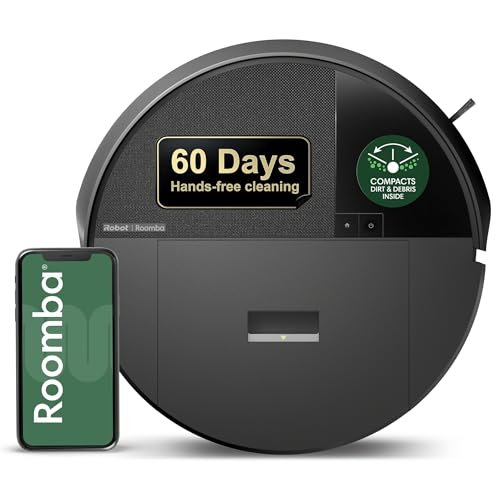
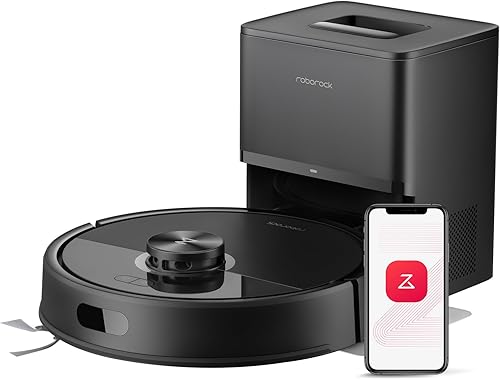
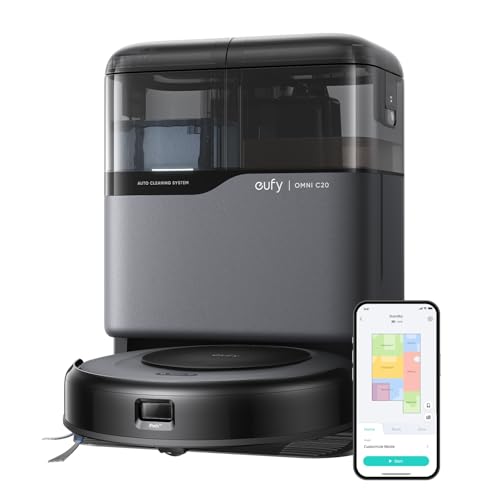
In an apartment, the robot’s specs matter less than how it lives in a small space. A dock that blocks the hallway, a robot too tall for the sofa or a motor that rattles through a shared wall is a daily annoyance. This guide covers what to check for a studio, a one-bedroom or a two-bedroom, including renter concerns, and then picks four robots from our lineup. For the full ranking of all nine, see our best robot vacuums of 2026 comparison.
We write from manufacturer pages and our own comparison of the published specs, not from measurements of our own. Where a brand gives a number from its own lab, we say so.
What Matters in Small Spaces
Dock footprint and height. Docks range from a small box to a tower. Measure the wall space you have and remember the robot needs clear floor in front of the dock to return.
Robot height. Sofas, beds and media consoles in apartments often leave three to four inches. A taller robot gets stuck or skips those areas.
Noise. Manufacturers do not publish noise figures consistently, which makes comparison hard.
Wi-Fi band. Apartment routers are often dual-band with a single network name. Some robots require 2.4 GHz, and setup can fail until you adjust.
Consumables and storage. Bags, detergent and spare pads need a shelf. Fewer consumables help in a small space.
Mapping and zones. Small homes still benefit from no-go zones around cords, pet bowls and floor lamps.
Dock Footprint and Clearance
Here are the footprints that the manufacturers list.
- Roomba 205 DustCompactor: no emptying dock, only a charging dock. iRobot says it compacts debris inside the robot for up to 60 days at a time. iRobot’s pages do not give dimensions for this model.
- Roborock Q7 M5+: the dock is about 8.3 by 7.0 by 10.2 in, according to the Roborock page cited in our Q7 M5+ profile. The robot is about 12.8 by 12.8 by 3.9 in (325 by 325 by 99 mm).
- eufy Omni C20: the robot is 3.35 in tall (85 mm). eufy’s page does not state the station dimensions in text, so check the listing images before you commit.
- Dreame L40 Ultra Gen 2: the dock is 17.99 by 13.39 by 23.23 in and weighs 19.53 lb, per Dreame, with a 4.5 L clean tank and a 4.0 L used tank you handle by hand. Our L40 profile suggests a spot near a sink or bathtub.
- Shark PowerDetect NeverTouch Pro: the packaged system is listed at 17.52 by 17.32 by 21.38 in. In a small apartment, a 21 in tall base is a real consideration.
- iRobot Roomba Max 705 Combo: the AutoWash dock is 18 by 16.9 by 17 in and 18.67 lb.
For a studio, the first two on the list are the practical ones. A full all-in-one dock can take over the corner of a small living room.
Noise and Neighbors
Noise has three parts: the robot cleaning, the dock emptying and the mop dry cycle.
Cleaning. eufy lists 54.22 dB for the Omni C20 in Standard vacuum-only mode. Most other manufacturers in this lineup do not publish a figure on the pages we read, so do not assume a number. Quiet modes exist on most models. eufy lists a longer runtime in Quiet mode, 121 minutes against 101 in Standard on wood floors with Boost IQ off.
Emptying. Dock emptying is the loudest moment. Ecovacs lists 75 dBA while its Omni station empties. We cannot compare other docks because their pages do not state it. A bagless or compacting design changes when and how often this happens.
Schedule around your neighbors. Run the robot while you are out, mid-morning or early afternoon, rather than early or late. Use the app’s schedule and off-peak charging where offered.
Renters, Floors and Leases
Robot vacuums need no installation, so renting is no obstacle. A few practical points apply.
- Check your lease for floor-care rules. Some leases mention finishes or flooring.
- Use no-go zones. All four picks below support them in the app. Draw them around rug fringe, cords and the area near the front door.
- Mop with care on hardwood. Use mopping only on sealed floors, keep water low and avoid unsealed or waxed boards. When unsure, run vacuum-only.
- Protect thresholds. Dreame lists 0.79 in for the L40 Ultra Gen 2, enough for typical door tracks and rug edges.
- Plan for a move. A small dock is easier to carry. The Dreame L40 robot weighs 8.58 lb, but its dock stays put at about 19.53 lb.
Wi-Fi Band and Smart Home
eufy states that the Omni C20 supports 2.4 GHz and that 5 GHz is not supported. Dreame says the X50 Ultra is also 2.4 GHz only. If your router combines both bands under one name, temporarily move your phone to 2.4 GHz, or separate the bands during setup. Roborock and iRobot list Alexa, Google Home or Siri support depending on model, and iRobot says the Max 705 is Matter-enabled with Apple Home.
Studio, One-Bedroom or Two-Bedroom
- Studio. A single living space gains little from a large dock. The Roomba 205 or the Q7 M5+ keeps the footprint small. A robot that does not fit under the bed or sofa will skip the floor beneath them.
- One-bedroom. The eufy Omni C20 fits here: eufy lists up to 950 sq ft of coverage and maps for up to three floors, and the 3.35 in body gets under low furniture.
- Two-bedroom. There is room for a larger dock. The Dreame L40 Ultra Gen 2 gives a self-washing dock in the entry tier of our lineup if you can spare the corner.
iRobot Roomba 205 DustCompactor: No Dock to Find Room For
A vacuum-only Roomba with LiDAR mapping and no emptying dock, for studios and renters who want the smallest footprint.
The 205 has the smallest footprint in our lineup because it does not need an emptying base. iRobot says debris is compacted and held inside the robot for up to 60 days at a time, and ClearView LiDAR maps the home and cleans in rows. The Roomba Home app has keep-out zones.
It is vacuum-only, so there is no mopping, and you empty the bin by hand. One caution: the version sold under this listing is the Vac, not the Combo that mops. See our Roomba 205 profile for the nuance.
Roborock Q7 M5+: Compact Self-Empty Dock
A budget-tier LiDAR robot with a small self-empty dock that Roborock rates at up to 7 to 9 weeks.
If you want to forget about the bin for weeks without a big base, the Q7 M5+ is the match. The dock is small at about 8.3 by 7.0 by 10.2 in, and Roborock rates it at up to 7 to 9 weeks based on in-house figures. The mop is a detachable pad with no stated lift, so draw no-go zones around rugs or remove it. It has no camera, so clear cords before a run. Read the Q7 M5+ profile.
eufy Omni C20: Low Body, Full Station
A 3.35 in body that fits under low furniture, a published 54.22 dB Standard-mode figure and a station that empties, washes and refills.
The C20 is the apartment pick when furniture clearance and noise matter. eufy lists the 3.35 in body, 950 sq ft coverage, three floor maps, a 3.1L bag and tanks of 2.5L clean and 2.4L dirty. The mop lifts 0.41 in, with a 0.98 in carpet limit. The pads dry with room-temperature air for four hours by default, so allow for that.
The limits: 2.4 GHz only, and a simpler navigation system with infrared and a point laser rather than a camera. Our eufy Omni C20 profile has the rest.
Dreame L40 Ultra Gen 2: For a Two-Bedroom With Room

A self-washing dock with extending mop and brush arms and a child lock, for apartments that can spare a corner.
The L40 is the apartment pick when you want a full dock and have somewhere to put it. Dreame says the dock auto-empties for up to 100 days into a 3.2 L bag, washes and dries the pads and refills the robot. The robot is 3.82 in tall, so check your low furniture, and Dreame lists a child lock and no-go zones in the app. See the L40 profile.
Before You Order
- Measure the dock spot, plus clear floor in front of it.
- Measure clearance under your sofa and bed against each robot’s height.
- Confirm that your router offers 2.4 GHz.
- Schedule runs around your neighbors.
- Check your lease for flooring rules.
Sources
Frequently asked questions
How much floor space does a robot vacuum dock need?
It ranges widely. Roborock's Q7 M5+ dock is about 8.3 by 7.0 by 10.2 in, while the Dreame L40 Ultra Gen 2 dock is 17.99 by 13.39 by 23.23 in and weighs 19.53 lb. Leave open floor in front of any dock so the robot can return.
Are robot vacuums too loud for apartments?
Manufacturers publish noise figures unevenly. eufy lists 54.22 dB for the Omni C20 in Standard vacuum-only mode, and Ecovacs lists 75 dBA for its dock while emptying. Run the robot while you are out, and avoid early or late hours if you share walls.
Can I use a robot vacuum in a rental?
Yes. Nothing about the setup needs installation or changes to the unit. Check your lease for any floor-care rules, and use no-go zones to protect delicate areas.
Do I need a self-emptying dock in a small apartment?
Not always. A small space produces less debris, and the Roomba 205 DustCompactor keeps dirt inside the robot for up to 60 days at a time, according to iRobot. A dock helps if you want to empty the bin only every few weeks.
Why does Wi-Fi band matter?
Several robots, including the eufy Omni C20 and Dreame X50 Ultra, support 2.4 GHz only. Many apartment routers combine bands under one name, which can make setup fail until you switch your phone to 2.4 GHz.